
Create a MySQL User account
Just click the link "MySQL Users" in the left menu of the Virtual Desktop. First, you will only see one link : "Create a new MySQL user account"
Click this link.
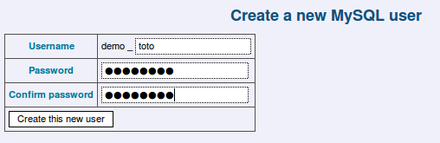
Fill the form for the user "toto".
- His username will always be your AlternC account then an underscore (_) then the account name.
- Of course, his password will be different than your main MySQL Account and main database. Validate by clicking the button [Create this new user].
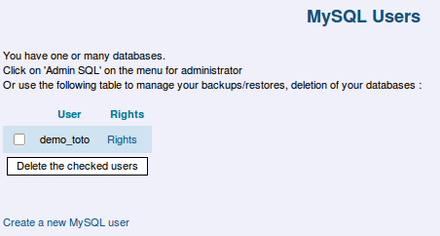
Now you can see this new account in the MySQL users list.
Granting access to your databases to a MySQL user
At the moment, this new user has no right to any database. Let’s grant him some rights, for example on the database named demo_spip. To do so, click the link "rights" on the right of this username.
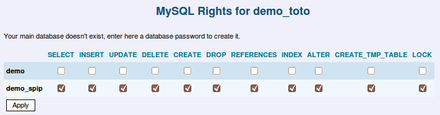
Choose which rights you want to give him, and check the checkboxes, then validate using the [Apply] button.
Now toto will have some rights on the database demo_spip. He is now able to access this database from his php code, or using PHPMyAdmin, which used to be installed with AlternC from this web address : http://servername.tld/admin/sql
For more information, see the chapter on PHPMyAdmin.
You can also delete a MySQL user account from here: just check his name and click the deletion button (a confirmation dialog will appear)


